

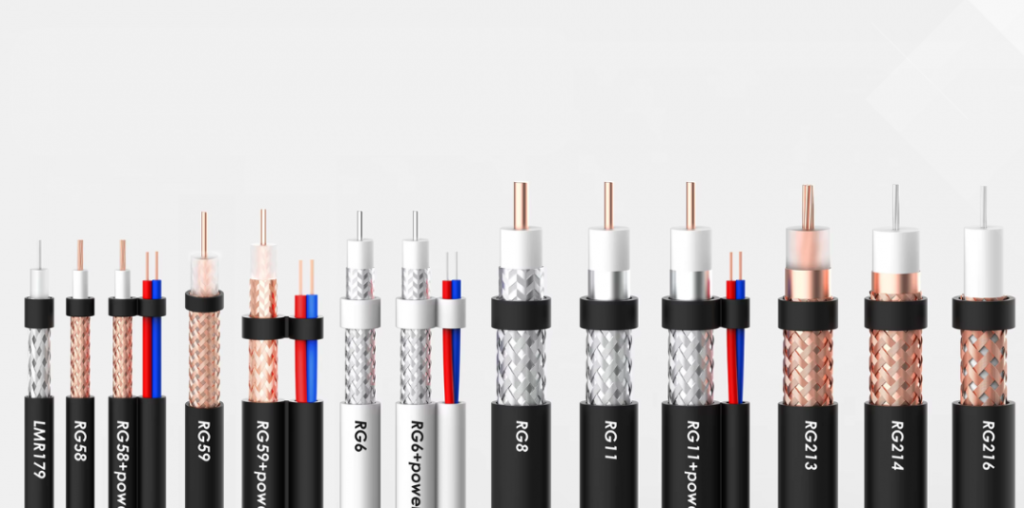
If you’ve ever installed a security camera, set up satellite TV, or run a network for a commercial building, you know the difference between a reliable signal and constant dropouts starts with choosing the right coaxial cable. With so many RG ratings available, picking the wrong one can lead to poor performance, higher installation costs, and even equipment damage from impedance mismatches.
In this guide, we’ll break down everything you need to know about the four most common coaxial cable types—RG6, RG58, RG59, and RG11—including their specifications, ideal use cases, and how to choose the right one for your project. We’ll also share pro tips for installation, common mistakes to avoid, and answer the most frequently asked questions from installers and DIYers alike.
What Is Coaxial Cable & How Does It Work?
Coaxial (or “coax”) cable is a specialized transmission line designed to carry high-frequency electrical signals with minimal loss and interference. First developed for military use during World War II (where the “RG” or “Radio Guide” designation originated), today’s coax cables are used for everything from cable TV and internet to security systems, radio communications, and broadcast networks.
All coax cables share the same four-layer core structure:
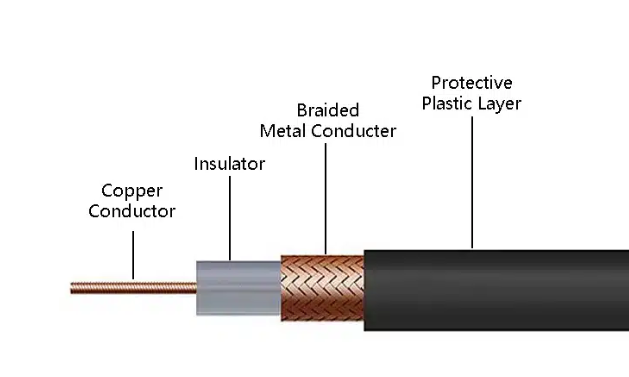
- copper conductor: A solid or stranded copper (or copper-clad steel) wire that carries the electrical signal
- insulator: A non-conductive layer that maintains consistent spacing between the center conductor and shield
- Braided Metal Conducter: One or more layers of foil, braided aluminum, or copper that blocks electromagnetic interference (EMI) and radio frequency interference (RFI)
- Protective Plastic Layer :A protective PVC or PE layer that shields the internal components from physical damage, moisture, and extreme temperatures
The quality and specifications of these layers determine a cable’s impedance, signal loss (attenuation), maximum frequency support, and ideal use cases. For most consumer and commercial applications, you’ll encounter two standard impedance ratings: 75 ohms (for video and broadband signals) and 50 ohms (for radio and data communications).
Full Breakdown: RG6 vs RG58 vs RG59 vs RG11
Let’s take a deep dive into each cable type, including their key specifications, strengths, weaknesses, and most common applications.
RG6 Coaxial Cable: The Industry Workhorse
Specifications:
- AWG: 18 AWG solid center conductor
- Impedance: 75 ohms
- Outer diameter: ~6.9 mm
- Shielding: Dual (foil + braid) or quad shield options
- Attenuation (2.4 GHz): ~5.8 dB per 100 feet
- Maximum recommended distance: 150-200 feet for high-bandwidth applications
What makes RG6 special:
RG6 is the most widely used coaxial cable today, and for good reason. It strikes the perfect balance between performance, flexibility, and cost, making it suitable for nearly all residential and light commercial applications. Unlike thinner alternatives, RG6 features a thicker dielectric insulator and improved shielding that supports higher frequencies up to 3 GHz, making it ideal for modern 4K video and high-speed internet.
Strengths:
- Excellent high-frequency performance (supports up to 3 GHz)
- Good balance of flexibility and durability
- Available in multiple shielding grades (dual/quad) for high-interference environments
- Suitable for both indoor and outdoor installations
- Wide range of connector options (F-type, BNC, RCA)
- Cost-effective for most projects
- Weaknesses:
- Higher signal loss than thicker RG11 for runs over 200 feet
- Less flexible than thinner RG59 for tight bend applications
RG6 coaxial cable uses:
- Cable TV (CATV) and satellite TV installations
- High-speed internet (cable modem) connections
- Over-the-air (OTA) antenna feeds
- CCTV and security camera systems (especially for runs over 100 feet)
- Video distribution systems for commercial buildings
- RG6 is available in specialized variants including plenum-rated (for air-handling spaces), riser-rated (for vertical runs between floors), direct burial (for underground installations), and siamese (combines coax with power wires for security camera systems).
RG59 Coaxial Cable: The Legacy Short-Run Option
Specifications:
- AWG: 22 AWG solid center conductor
- Impedance: 75 ohms
- Outer diameter: ~5.8 mm
- Shielding: Typically dual shield (foil + braid)
- Attenuation (2.4 GHz): ~10 dB per 100 feet
- Maximum recommended distance: 100 feet or less for low-frequency applications
What makes RG59 special: RG59 is the older, thinner predecessor to RG6. While it’s less common in new installations today, it’s still widely used for short-run, low-frequency applications where flexibility is more important than maximum bandwidth. Its smaller diameter makes it easier to route through tight spaces in walls and ceilings, and it’s often less expensive than RG6 for short runs.
Strengths:
- Very flexible and easy to route through tight spaces
- Lower cost for short runs
- Sufficient performance for analog video and low-frequency signals
- Lightweight and easy to handle during installation
Weaknesses:
- Higher signal loss than RG6, especially at higher frequencies
- Not suitable for high-bandwidth applications (4K video, high-speed internet)
- Limited maximum distance (under 100 feet)
- Thinner shielding provides less protection against interference
Best use cases:
- Analog CCTV systems with short cable runs
- Closed-circuit video systems in small buildings
- Component video connections for older AV equipment
- Short-run video distribution in residential settings
Note: RG59 is not recommended for new cable TV, satellite, or internet installations, as it cannot support the high frequencies required for modern broadband and 4K video services.
RG58 Coaxial Cable: The 50-Ohm RF Specialist
Related OUKETECH resources: custom telecom cable assemblies.
Specifications:
- AWG: 20 AWG stranded or solid center conductor
- Impedance: 50 ohms (critical difference from other common coax types)
- Outer diameter: ~5 mm
- Shielding: Typically dual shield (foil + braid)
- Attenuation (2.4 GHz): ~12 dB per 100 feet
- Maximum recommended distance: 50-100 feet depending on frequency
What makes RG58 special: RG58 stands out from the other cables in this guide because it uses a 50-ohm impedance rating rather than the standard 75 ohms. This makes it unsuitable for video and broadband applications (which require 75-ohm impedance matching), but ideal for radio frequency (RF) communications, data networks, and test equipment.
Strengths:
- Excellent performance for RF and low-frequency data applications
- Very flexible and easy to work with
- Wide availability of BNC connectors for test equipment and radio systems
- Suitable for both stationary and portable applications
Weaknesses:
- 50-ohm impedance makes it incompatible with 75-ohm video and broadband equipment
- Higher signal loss than RG6 or RG11
- Not suitable for long runs or high-bandwidth applications
Best use cases:
- Two-way radio (walkie-talkie) systems
- Ham radio installations
- Test and measurement equipment in laboratory settings
- Ethernet over coax (10BASE2) legacy networks
- Short-run RF signal distribution in commercial settings
Important: Never use RG58 for video, cable TV, or internet installations. The impedance mismatch will cause severe signal reflections and damage to equipment.
RG11 Coaxial Cable: The Long-Distance Heavy-Duty Option
Specifications:
- AWG: 14 AWG solid center conductor
- Impedance: 75 ohms
- Outer diameter: ~10.3 mm
- Shielding: Dual or quad shield for maximum interference protection
- Attenuation (2.4 GHz): ~3.2 dB per 100 feet
- Maximum recommended distance: 300-500 feet for high-bandwidth applications
What makes RG11 special:
RG11 is the thickest, most heavy-duty coaxial cable commonly used in residential and commercial installations. Its large center conductor and high-quality shielding provide significantly lower signal loss than RG6, making it ideal for long-distance runs where signal strength is critical.
Strengths:
- Extremely low signal loss, even at high frequencies
- Supports maximum run lengths up to 500 feet (twice as far as RG6)
- Superior shielding for high-interference environments
- Durable construction suitable for outdoor and direct burial installations
- Excellent performance for high-bandwidth 4K/8K video and gigabit internet
Weaknesses:
- Very stiff and difficult to bend (minimum bend radius is ~10x outer diameter)
- More expensive than RG6 for comparable lengths
- Requires special connectors and installation tools
- Not suitable for routing through tight spaces in walls or ceilings
Best use cases:
- Long-distance backbone runs for cable TV and internet service providers
- Feeder cables from street distribution points to buildings
- Large commercial building video distribution systems
- Long-run OTA antenna installations for rural properties
- High-performance CCTV systems for campuses and industrial sites
RG11 is almost never used for in-wall residential installations due to its thickness and inflexibility. It’s typically reserved for outdoor or main distribution runs, where its low signal loss provides the most benefit.
Side-by-Side Comparison Table
| Feature | RG6 | RG58 | RG59 | RG11 |
| AWG Size | 18 AWG | 20 AWG | 22 AWG | 14 AWG |
| Impedance | 75 ohms | 50 ohms | 75 ohms | 75 ohms |
| Attenuation (2.4 GHz, 100ft) | ~5.8 dB | ~12 dB | ~10 dB | ~3.2 dB |
| Maximum Recommended Distance | 150-200 ft | 50-100 ft | <100 ft | 300-500 ft |
| Flexibility | Good | Excellent | Excellent | Poor (very stiff) |
| Shielding Options | Dual/Quad | Dual | Dual | Dual/Quad |
| Typical Applications | CATV, internet, CCTV, satellite | Radio, test equipment, RF | Short-run CCTV, analog video | Long-distance backbone runs |
| Pros | Balanced performance, flexible, cost-effective | Very flexible, ideal for RF applications | Low cost, highly flexible | Lowest signal loss, longest range |
| Cons | Higher loss than RG11 for long runs | 50-ohm impedance incompatible with video systems | Poor high-frequency performance, short range | Expensive, difficult to install in tight spaces |
| Price Level (per 100ft) | $$ | $$ | $ | $$$ |
Head-to-Head Comparisons
RG6 vs RG59: Which Should You Choose?
The most common question we hear from installers is when to use RG6 vs RG59. The answer depends almost entirely on your application and required run length:
- Choose RG6 if: You need support for high frequencies (cable internet, satellite TV, 4K video), runs longer than 100 feet, or better protection against interference. RG6 is the standard for all new residential and commercial installations, and it’s backwards compatible with RG59 connectors and equipment.
- Choose RG59 if: You’re working on a legacy analog CCTV system with very short runs (under 50 feet) and you already have RG59 cable on hand, or you need maximum flexibility for routing through extremely tight spaces. For all new installations, RG6 is almost always the better choice.
The difference between RG6 and RG59 performance becomes very noticeable at frequencies above 1 GHz, where RG59’s signal loss is 2-3x higher than RG6. For modern broadband and video services, RG6 is the clear choice.
RG58 vs 75-Ohm Cables: Understanding Impedance Mismatch Risks
It’s critical to understand that RG58’s 50-ohm impedance makes it fundamentally incompatible with 75-ohm video and broadband equipment. Connecting RG58 cable to a 75-ohm device will cause:
- Signal reflections: Up to 50% of the signal can be reflected back to the source, causing severe dropouts and poor performance
2、Equipment damage: In extreme cases, the reflected power can damage transmitters and other sensitive equipment
3、Non-compliant installations: Most building codes and service provider requirements mandate 75-ohm cable for video and broadband applications
The only time you should use RG58 is when you’re working specifically with 50-ohm RF equipment, such as two-way radios, test instruments, or legacy 10BASE2 networks. For all other applications, choose a 75-ohm cable type.
RG11 vs RG6: When Long Distance Matters
For runs longer than 200 feet, RG11’s lower signal loss makes it the clear choice. For example:
A 300-foot run of RG6 will lose ~17.4 dB at 2.4 GHz, which may be too much for reliable signal
The same run of RG11 will only lose ~9.6 dB, leaving plenty of signal strength for reliable operation
However, RG11’s thickness and stiffness make it much harder to install. Most installers use RG11 for outdoor feeder runs, then transition to RG6 for in-building distribution to balance performance and installation cost.
Practical Selection Guide: How to Choose the Right Cable for Your Project
Use this step-by-step process to select the perfect coaxial cable for your needs:
- Identify your equipment’s impedance requirement
First, check the specifications for the devices you’ll be connecting:
Video, CATV, satellite, and broadband internet equipment almost always requires 75-ohm cable (RG6, RG59, RG11)
Radio, test equipment, and RF systems typically require 50-ohm cable (RG58 or other specialized types)
Never mix impedance ratings in the same installation. - Calculate your required cable run length
Measure the total distance your cable needs to cover, including extra for routing around obstacles and making connections at both ends:
Under 100 feet: RG59 (for low-frequency applications) or RG6 (for high-frequency)
100-200 feet: RG6
Over 200 feet: RG11
Always choose the cable with the lowest attenuation that fits your budget and installation constraints. - Consider your environment and installation location
Where will you be running the cable?
Indoor walls/ceilings: Choose standard PVC-jacketed cable with appropriate fire rating (riser or plenum if required by code)
Outdoor exposed installations: Choose UV-stabilized PE jacketed cable rated for outdoor use
Underground direct burial: Choose gel-filled or water-blocked cable designed for underground installation
High-interference environments (near power lines, industrial equipment): Choose quad-shielded cable for maximum protection against EMI/RFI
Air-handling spaces (plenum): Choose plenum-rated cable with low-smoke, fire-resistant jacket - Match connector types to your equipment
Different applications require different connectors:
CATV, satellite, internet: F-type connectors (the standard screw-on connectors used for cable modems and TV boxes)
CCTV and video systems: BNC connectors (bayonet-style connectors that lock into place for secure connections)
Consumer AV equipment: RCA connectors (for analog video and audio connections)
Radio and test equipment: BNC, N-type, or SMA connectors depending on the specific device
Make sure your cable is compatible with the connectors you need to use. Thicker RG11 cable requires specialized F-type connectors designed for its larger diameter. - Balance performance and budget
While it’s tempting to choose the cheapest cable available, investing in higher-quality cable will save you money in the long run by reducing service calls and improving performance. As a general rule:
Don’t use RG59 for new installations unless you have a very specific reason to do so
Spend the extra 10-15% for quad-shielded cable if you’re installing in a high-interference environment
For runs over 200 feet, the extra cost of RG11 is almost always worth it to avoid signal issues
Common Installation Mistakes & Pro Tips
Even the best cable will perform poorly if installed incorrectly. Avoid these common mistakes, and follow these pro tips for reliable, long-lasting installations:
Common Mistakes to Avoid
- Exceeding maximum bend radius: Coax cables have a minimum bend radius (typically 10x the cable diameter for RG6). Bending the cable tighter than this can damage the dielectric and shielding, causing signal loss and reflections.
- Poor connector installation: Improperly crimped or compressed connectors are the #1 cause of signal issues in coax installations. Always use high-quality connectors and the correct installation tools, and test every connection with a cable tester before finishing.
- Running coax parallel to power lines: Running coaxial cable within 6 inches of high-voltage power lines can cause severe interference. When crossing power lines, always cross at a 90-degree angle to minimize interference.
- Using the wrong impedance cable: As we discussed earlier, mixing 50-ohm and 75-ohm cable in the same installation will cause severe performance issues and may damage equipment.
- Skimping on shielding: In high-interference environments, dual-shielded cable may not provide enough protection. Spend the extra money for quad-shielded cable to avoid future problems.
Pro Installation Tips
- Use compression connectors, not crimp connectors: Compression connectors provide a much more reliable, weatherproof connection than crimp connectors, especially for outdoor installations. They’re slightly more expensive and require a special tool, but the extra reliability is worth it.
- Leave extra cable at both ends: Always leave 2-3 feet of extra cable at both ends of your run to allow for future moves, adjustments, or connector re-termination.
- Label both ends of every cable: This will save you hours of troubleshooting later, especially in large commercial installations with dozens of cable runs.
- Test every cable run after installation: Use a coax cable tester to check for continuity, short circuits, and excessive signal loss before closing up walls or finishing the installation.
- Use cable supports for long runs: For vertical runs or long horizontal runs, use cable hangers or supports every 3-4 feet to prevent strain on the cable and connectors.
- Seal outdoor connections: For outdoor or underground installations, use self-amalgamating tape or weatherproof boots to seal connectors and prevent water damage.
Frequently Asked Questions
Q: Can I use RG58 instead of RG6 for my TV antenna?
A: No. RG58 has a 50-ohm impedance, while TV antennas and equipment require 75-ohm cable. The impedance mismatch will cause severe signal loss and reflections, resulting in poor or no reception. Always use RG6 for antenna installations.
Q: Is RG11 better than RG6?
A: RG11 provides better performance (lower signal loss) than RG6, especially for long runs, but it’s more expensive and much harder to install. For runs under 200 feet, RG6 provides more than enough performance for most applications. For runs over 200 feet, RG11 is the better choice.
Q: What’s the difference between dual-shield and quad-shield cable?
A: Dual-shield cable has two layers of shielding (one foil, one braid), while quad-shield cable has four layers (two foil, two braid). Quad-shield cable provides much better protection against EMI and RFI, making it ideal for installations near power lines, industrial equipment, or in areas with high levels of radio interference.
Q: Can I mix RG6 and RG59 in the same installation?
A: Yes, as long as both are 75-ohm impedance, they are compatible. However, the overall performance will be limited by the RG59 sections, which have higher signal loss. For best results, use RG6 throughout the entire installation.
Q: How far can I run RG6 for internet?
A: For most cable internet systems, the maximum recommended run length for RG6 is 150-200 feet. Beyond that, signal loss may cause reduced speeds or dropped connections. For longer runs, use RG11 cable or install a signal amplifier.
Q: What type of coax cable is best for CCTV?
A: For analog CCTV systems with short runs (under 100 feet), RG59 works well. For longer runs or high-definition (HD-CVI, HD-TVI, SDI) systems, RG6 is the better choice due to its lower signal loss at higher frequencies. For runs over 200 feet, use RG11 or consider switching to IP cameras with Ethernet cabling.
Q: Are all F-type connectors the same?
A: No. F-type connectors are designed for specific cable sizes. Make sure you buy connectors rated for the cable you’re using (RG6, RG59, or RG11), as using the wrong size will result in a poor connection and signal loss.
Conclusion: Final Recommendations
With so many coaxial cable options available, choosing the right one doesn’t have to be complicated. Here are our final recommendations based on common use cases:
For most residential and commercial installations: RG6
RG6 provides the perfect balance of performance, flexibility, and cost for nearly all applications, including cable TV, internet, OTA antennas, and security camera systems. It’s the industry standard for a reason, and it will meet the needs of 90% of installations.
For short-run analog CCTV and legacy AV systems: RG59
If you’re working on a legacy system with very short runs and low bandwidth requirements, RG59 is a cost-effective choice. For all new installations, we recommend upgrading to RG6 for future-proofing.
For radio, test equipment, and RF applications: RG58
RG58 is the standard for 50-ohm RF applications. Just make sure you never use it for video or broadband installations, as the impedance mismatch will cause severe issues.
For long-distance runs over 200 feet: RG11
When you need to cover long distances with minimal signal loss, RG11 is the clear choice. It’s more expensive and harder to install, but its superior performance makes it worth it for backbone runs and rural installations.
By following the guidance in this guide, you’ll be able to choose the perfect coaxial cable for your project, avoid common installation mistakes, and ensure reliable, high-performance signal transmission for years to come.
Overall, RG6, RG58, RG59, and RG11 coaxial cables deliver differentiated transmission performance, impedance specifications and application advantages to meet diverse RF and signal transmission needs. Proper cable selection effectively avoids signal attenuation, electromagnetic interference and compatibility issues. As a professional manufacturer of custom cable components and custom wire harnesses, OUKETECH provides customized full-series high-precision coaxial cable assemblies, as well as tailored industrial wire harnesses, automotive wire harnesses, and medical wire harnesses. Our products are widely applied in industrial automation, automotive electronics, medical equipment, security communication, outdoor engineering and other demanding scenarios. Adhering to standardized production and strict quality control, we offer integrated, stable, low-loss and high-compatibility cable solutions with mature R&D and customization capabilities. Feel free to contact us for professional cable selection, customization and technical support to meet your project requirements.