

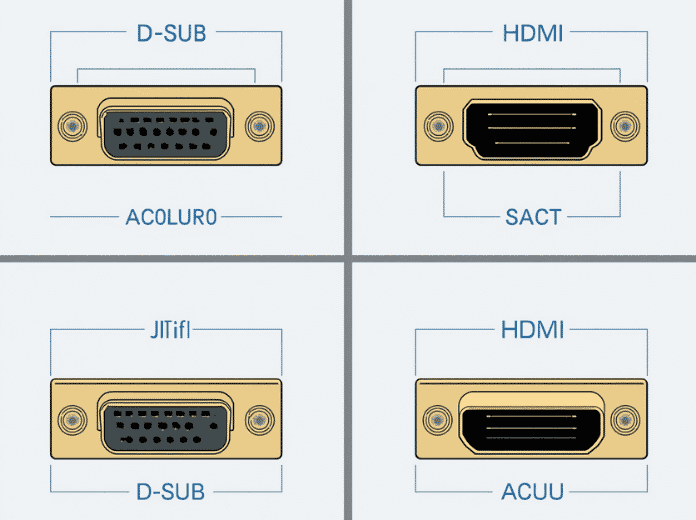
You’re staring at the back of an old industrial controller. It has a D-Sub port. Your monitor only takes HDMI. Now what?
This exact scenario plays out in factories, labs, and server rooms every day. D-Sub (often called VGA) and HDMI represent two different eras of display technology — analog vs digital, legacy vs modern. But “newer” doesn’t always mean “better for your specific use case.”
Let’s break down what each connector actually does, where they shine, and how to make the right call.
Table of Contents
- What Is a D-Sub Connector?
- What Is HDMI?
- D-Sub vs HDMI: Head-to-Head Comparison
- Beyond D-Sub and HDMI: DVI and DisplayPort
- Why D-Sub Refuses to Die: Industrial and Professional Applications
- D-Sub to HDMI Conversion: What You Need to Know
- How to Choose: Decision Framework
- FAQ: D-Sub vs HDMI
What Is a D-Sub Connector?
D-Subminiature — shortened to D-Sub — is a connector family first developed by ITT Cannon in 1952. The name comes from its distinctive D-shaped metal shield, which serves three purposes: it guarantees correct orientation when plugging in, provides mechanical rigidity, and acts as an electromagnetic interference (EMI) shield.
The defining physical feature of any D-Sub connector is the two thumbscrews on either side. Unlike snap-in connectors such as HDMI or USB, D-Sub connections are semi-permanent — once screwed down, they don’t come loose from vibration or cable tugging. This design choice is why D-Sub remains standard equipment in industrial machinery, aerospace avionics, and medical imaging systems decades after it disappeared from consumer laptops.
Common D-Sub Pin Configurations
D-Sub isn’t one connector — it’s a family with multiple shell sizes and pin counts:
| Connector Type | Pin Count | Row Layout | Typical Application |
|---|---|---|---|
| DE-9 | 9 pins | 2 rows (5+4) | RS-232 serial communication, PLC controllers |
| DA-15 | 15 pins | 2 rows (8+7) | Legacy game ports, industrial I/O |
| DE-15 (VGA) | 15 pins | 3 rows (5+5+5) | Analog video (VGA standard) |
| DB-25 | 25 pins | 2 rows (13+12) | Parallel printer ports, CNC machine interfaces |
| DC-37 | 37 pins | 2 rows | Telecommunications, military data links |
The VGA connector you remember from old monitors is technically a DE-15 — a high-density 15-pin D-Sub variant. This is the version most people mean when they say “D-Sub vs HDMI.”Industry Insight: The multi-pin flexibility of D-Sub connectors makes them uniquely suited for combined signal + power transmission in a single connector body. This is the same design philosophy behind modern custom wire harnesses — integrating multiple signal types into one reliable assembly reduces points of failure and simplifies installation.
What Is HDMI?
HDMI (High-Definition Multimedia Interface) launched in 2002 as a joint effort by Hitachi, Panasonic, Philips, Sony, and others. It was designed to solve a specific problem: consumers were tired of running separate cables for video and audio.
HDMI transmits uncompressed digital video and audio through a single cable. Unlike D-Sub’s analog signal, HDMI sends binary data — the image either arrives perfectly or it doesn’t. There’s no gradual signal degradation.
HDMI Version Evolution
| Version | Year | Max Resolution | Max Bandwidth | Key Features |
|---|---|---|---|---|
| HDMI 1.4 | 2009 | 4K @ 30Hz | 10.2 Gbps | 3D support, Ethernet channel, ARC |
| HDMI 2.0 | 2013 | 4K @ 60Hz | 18 Gbps | HDR, 32 audio channels, dual video streams |
| HDMI 2.1 | 2017 | 10K @ 120Hz | 48 Gbps | Dynamic HDR, eARC, VRR, ALLM |
For most users today, HDMI 2.0 is the baseline — it handles 4K/60Hz without breaking a sweat. HDMI 2.1 is what you want for 4K/120Hz gaming or 8K displays.
D-Sub vs HDMI: Head-to-Head Comparison
Here’s where the rubber meets the road:
| Feature | D-Sub (VGA/DE-15) | HDMI |
|---|---|---|
| Signal Type | Analog | Digital |
| Max Resolution | 2048×1536 (theoretical) | 10K (HDMI 2.1) |
| Practical Resolution | 1920×1080 @ 60Hz | 4K @ 120Hz (HDMI 2.1) |
| Audio Support | None (video only) | Up to 32 channels, Dolby Atmos |
| Max Cable Length | ~30 meters (with quality cable) | ~15 meters (passive), ~50m (active/fiber) |
| Connector Locking | Thumbscrews (secure) | Friction fit (no lock) |
| Hot-Swappable | No (not designed for it) | Yes |
| Content Protection | None | HDCP 2.3 |
| EMI Resistance | Moderate (analog susceptible) | High (digital + error correction) |
Signal Quality: The Analog Problem
D-Sub carries analog video as a continuously varying voltage. Over distance, that voltage degrades — colors shift, sharpness drops, ghosting appears. Every meter of cable, every connector joint, every conversion chip adds noise.
HDMI’s digital signal doesn’t have this problem. It’s a stream of 1s and 0s protected by error correction. Either the data arrives intact, or you get no picture at all. There’s no in-between “fuzzy but working” state.
The Input Lag Surprise
Here’s something most guides won’t tell you: D-Sub can have lower input lag than HDMI.
Because D-Sub is analog, the monitor doesn’t need to decode or process the signal — it drives the display directly. HDMI requires digital processing (decoding, HDCP handshake, scaling), which adds 1-3 frames of latency. For competitive retro gaming on CRT monitors, D-Sub is actually preferred for this reason.
That said, modern gaming monitors with “Game Mode” have reduced HDMI input lag to near-zero. For 99% of users, this difference is irrelevant.
Beyond D-Sub and HDMI: DVI and DisplayPort
The display connector landscape has four major players. Here’s how they all fit:
| D-Sub (VGA) | DVI | HDMI | DisplayPort | |
|---|---|---|---|---|
| Introduced | 1987 | 1999 | 2002 | 2008 |
| Signal | Analog | Digital + Analog (DVI-I) | Digital | Digital |
| Audio | No | No (video only) | Yes | Yes |
| Max Resolution | 1080p | 2560×1600 (dual-link) | 10K (2.1) | 16K (2.1) |
| Locking | Screws | Screws | None (friction) | Optional latch |
| Primary Use | Legacy/Industrial | Transitional (rare now) | Consumer + Prosumer | Professional/PC |
DVI was the bridge technology — it could carry both analog (DVI-A) and digital (DVI-D) signals, making it compatible with both VGA monitors and early digital displays. Today, DVI is effectively dead in new products.
DisplayPort is HDMI’s main competitor in the PC space. It supports higher bandwidth, daisy-chaining multiple monitors, and packet-based data transmission (the same approach used by Ethernet and PCIe). For multi-monitor workstation setups, DisplayPort is generally the better choice.
Why D-Sub Refuses to Die: Industrial and Professional Applications
If D-Sub is so outdated, why is it still everywhere in factories, hospitals, and military installations?
1. Mechanical Reliability
The screw-lock mechanism isn’t a design quirk — it’s a requirement. In environments with constant vibration (manufacturing floors, vehicle-mounted systems, aircraft), friction-fit connectors like HDMI will eventually work loose. D-Sub’s thumbscrews create a connection that stays put for years.
2. Legacy System Compatibility
Industrial controllers, CNC machines, and medical imaging equipment have service lives of 15-30 years. Replacing a perfectly functional $50,000 MRI console because its video connector is obsolete makes no economic sense. D-Sub persists because the equipment it connects to is still running — and will be for another decade.
3. Multi-Pin Versatility
A single DB-25 connector can carry video, serial data, and control signals simultaneously. In tight equipment enclosures, one D-Sub connector can replace three or four separate modern connectors. This density is valuable in aerospace and military applications where space and weight are at a premium.
4. EMI Shielding
The D-shaped metal shell provides inherent EMI protection. In electrically noisy environments — next to motors, relays, or RF equipment — this shielding matters. Consumer-grade HDMI cables rarely offer the same level of interference rejection.Industry Insight: In medical environments, connector reliability directly impacts patient safety. A loose video connection on a surgical display isn’t an inconvenience — it’s a critical failure. That’s why medical wire harness assemblies often specify D-Sub connectors with locking screws and gold-plated contacts, even when more modern alternatives exist.
D-Sub to HDMI Conversion: What You Need to Know
Converting D-Sub (analog) to HDMI (digital) isn’t a simple pin-to-pin adapter job. You need an active converter — a device with a built-in chip that digitizes the analog signal.
Your Options
| Solution | Cost | Quality | Best For |
|---|---|---|---|
| D-Sub to HDMI adapter dongle | $10-25 | Acceptable for 1080p | Occasional use, presentations |
| Powered VGA to HDMI converter box | $30-80 | Good, stable signal | Permanent installations |
| VGA to HDMI cable (built-in chip) | $15-30 | Variable (depends on chip quality) | Simple single-device setups |
What to Watch For
- USB power requirement: Most active converters need USB power to run the conversion chip. Make sure you have a free USB port nearby.
- Resolution limits: Budget converters typically max out at 1080p. If you need 1920×1200 or higher, invest in a quality converter box.
- Aspect ratio issues: Some converters stretch 4:3 D-Sub output to 16:9 HDMI, distorting the image. Check for converters with aspect ratio settings.
- No audio on D-Sub: Remember — D-Sub is video-only. If your source device outputs audio separately (3.5mm jack, RCA), you’ll need to route that independently.
How to Choose: Decision Framework
Ask yourself these four questions:
1. What’s the source device?
Modern laptop/console/Blu-ray player → HDMI
Old PC, industrial controller, legacy server → D-Sub (or D-Sub + converter)
2. What resolution do you need?
1080p or below → Either works (with conversion if needed)
4K or above → HDMI (or DisplayPort)
3. What’s the environment?
Living room, office desk → HDMI (convenient, single cable)
Factory floor, vehicle, outdoor installation → D-Sub (screw-lock reliability)
4. Do you need audio?
Yes → HDMI (D-Sub can’t carry audio)
Video only → Either works
The Short Answer
For consumer electronics and modern PCs: HDMI wins. It’s faster, cleaner, carries audio, and supports every resolution you’ll realistically use.
For industrial equipment, legacy systems, and high-vibration environments: D-Sub still makes sense. Its mechanical robustness and multi-pin flexibility haven’t been matched by any modern consumer connector.
FAQ: D-Sub vs HDMI
Is D-Sub the same as VGA?
Not exactly. VGA is a video signal standard that uses a 15-pin D-Sub connector (DE-15). D-Sub is the connector family; VGA is one of many protocols that run over it. Other D-Sub applications include RS-232 serial ports (DE-9) and parallel printer interfaces (DB-25).
Can I plug a D-Sub cable into an HDMI port?
No — the connectors are physically incompatible and the signals are completely different (analog vs digital). You need an active converter.
Does D-Sub support 1080p?
Yes. A quality VGA cable can carry 1920×1080 at 60Hz, though image sharpness may be slightly softer than a digital connection. The theoretical maximum for VGA is 2048×1536.
Why do some professional monitors still include D-Sub ports?
Backward compatibility. Many enterprise and industrial customers have fleets of older computers that only output VGA. Including a D-Sub port costs manufacturers pennies and keeps those customers in their ecosystem.
Is HDMI being replaced by USB-C?
USB-C with DisplayPort Alt Mode can carry video signals and is gradually replacing HDMI on laptops and mobile devices. However, HDMI remains dominant on TVs, projectors, gaming consoles, and desktop monitors. The two will coexist for years.
Are D-Sub cables still manufactured?
Yes — and not just as legacy replacements. D-Sub connectors are actively specified in new industrial, aerospace, and medical equipment designs. Custom manufacturers regularly produce D-Sub custom cable assemblies with specific pin counts, shielding requirements, and overmolding for harsh-environment applications.
The Bottom Line
D-Sub vs HDMI isn’t a fair fight in terms of raw specs — HDMI wins on resolution, audio, and convenience. But specs aren’t the whole story.
D-Sub survives because it solves problems HDMI wasn’t designed for: vibration-proof locking, multi-signal integration, and decades-long service life in punishing environments. In a factory, a hospital, or an aircraft, a connector that never wiggles loose is worth more than one that supports 8K.
Choose based on your environment, not just the spec sheet. For your living room, go HDMI. For your production line, D-Sub might still be the right tool for the job — and in applications where reliability is non-negotiable, from industrial wire harness systems to aerospace avionics, that mechanical robustness is exactly what keeps D-Sub relevant after 70 years.
Related Pages on OUKETECH
- Custom Cable Assemblies — High-quality custom cable manufacturing for consumer and industrial applications
- Custom Wire Harnesses — Full-service wire harness design, prototyping, and mass production
- Medical Wire Harness — Precision wire harness assemblies meeting strict medical industry standards
- Industrial Wire Harness — Reliable harness solutions for machinery, automation, and harsh environments