

You’re crimping Ethernet cables for a new office setup. You’ve got a box of Cat6 cable, a bag of RJ45 connectors, and a crimp tool. But the Cat6 conductors are thicker than you expected — they barely fit into the connectors you bought. Two hours and six failed crimps later, you realize: not all RJ45 connectors are the same.
RJ45 is the most common network connector on the planet. It’s on every router, switch, PC, and IP camera you’ve ever plugged in. But “RJ45” is a label that hides a surprising amount of variety — different categories, wiring standards, shielding types, and form factors.
This guide covers everything: what RJ45 actually means, how to wire it correctly, which category to choose, and how to avoid the mistakes that turn a simple crimp job into a troubleshooting nightmare.
Table of Contents
Related OUKETECH resources: custom telecom cable assemblies.
RJ45 vs Ethernet Port vs Ethernet Cable: Clearing Up the Confusion
RJ45 Connector Components: What’s Inside That Clear Plastic Plug
RJ45 Cable Categories: Cat5 to Cat8 Compared
T568A vs T568B Wiring Standards
Straight-Through vs Crossover Cables
UTP vs STP: Shielded or Unshielded?
RJ45 Connector Types: Beyond the Basic Plastic Plug
How to Crimp an RJ45 Connector: Step-by-Step
Real-World Applications of RJ45 Connectors
How to Choose the Right RJ45 Connector
What Is an RJ45 Connector?
Related OUKETECH resources: custom Ethernet cable assemblies.
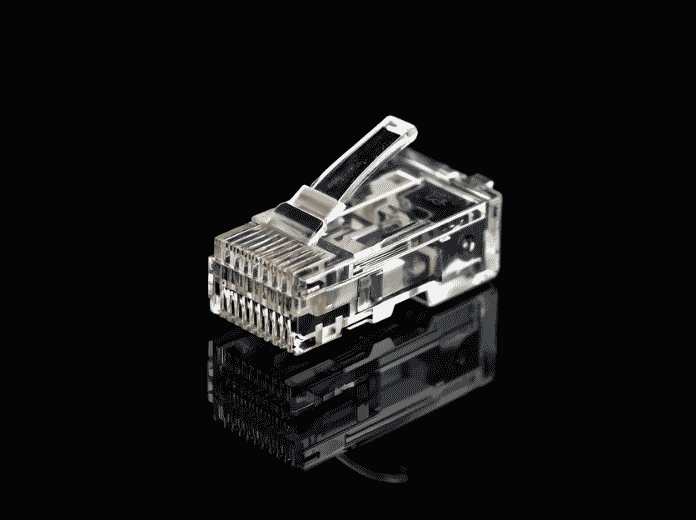
RJ45 stands for Registered Jack 45. It’s an 8P8C (8 Position, 8 Contact) modular connector — a clear plastic plug with eight gold-plated metal contacts that terminate the eight individual wires inside an Ethernet cable.
The “Registered Jack” part comes from its origins in the Bell System’s Universal Service Ordering Codes (USOC) for telephone wiring. RJ45 was originally designed for telephone networks, not data. But as Ethernet became the dominant LAN standard, the 8P8C connector was adopted as the physical interface — and the name “RJ45” stuck, even though technically an Ethernet connection uses a different wiring scheme than the original RJ45 telephone spec.
RJ45 vs RJ11: Don’t Mix Them Up
RJ45 looks a lot like the RJ11 connector used on old landline telephones, but there are key differences:
| Feature | RJ45 | RJ11 |
|---|---|---|
| Size | Larger (~11.5mm wide) | Smaller (~9.6mm wide) |
| Contacts | 8P8C (8 positions, 8 contacts) | 6P4C or 6P2C (6 positions, 4 or 2 contacts) |
| Wires | 8 wires (4 twisted pairs) | 4 or 2 wires |
| Use | Ethernet, data networks | Telephone, DSL, fax |
| Plug fit | Won’t fit in RJ11 jack | Will fit loosely in RJ45 jack (but won’t work) |
The loose fit of an RJ11 plug in an RJ45 jack is a common source of confusion — it physically goes in, but the pin alignment is wrong and no data will pass.
How the 8P8C Connector Actually Works
Inside the clear plastic housing, eight V-shaped gold-plated contacts are positioned above eight channels. When you insert the prepared cable and crimp, each contact pierces through the insulation of its assigned wire and bites into the copper conductor. This creates a gas-tight connection — no solder, no screws, just precise mechanical pressure.
The clear plastic body isn’t just for show. It lets you visually verify that all eight wires are fully seated at the front of the connector before crimping — the #1 quality check in any cable assembly process.
Industry Insight: The 8P8C crimp termination is elegant in its simplicity, but it’s also unforgiving. A single wire that’s 0.5mm short of the front face, or a single contact that didn’t fully pierce the insulation, creates a cable that passes a continuity test but fails under real network load. This is why professional cable assembly houses — whether making custom cable assemblies for data centers or Ethernet patch cords for office networks — use automated crimping machines with force monitoring on every termination.
RJ45 vs Ethernet Port vs Ethernet Cable: Clearing Up the Confusion
These three terms get thrown around interchangeably, but they refer to different things:
| Term | What It Is | Where You Find It |
|---|---|---|
| RJ45 Connector | The 8P8C plastic plug at the end of a cable | On both ends of an Ethernet patch cable |
| Ethernet Port (LAN Port) | The female socket on a device | Back of router, switch, PC, game console |
| Ethernet Cable | The entire cable assembly (cable + two RJ45 plugs) | Connecting devices to a network |
Think of it this way: the RJ45 connector is the plug, the Ethernet port is the socket it goes into, and the Ethernet cable is the whole thing — cable plus two connectors.
An Ethernet port can also be called a LAN port or a network port. They all mean the same thing: an 8-pin female jack that accepts an RJ45 plug. Not all network ports are RJ45 — fiber ports (SFP, SFP+) use completely different connectors — but in copper Ethernet, RJ45 is the universal standard.
RJ45 Connector Components: What’s Inside That Clear Plastic Plug
Every RJ45 connector, regardless of category or brand, has four essential components:
1. Plastic Housing
The clear (or sometimes translucent colored) body that holds everything together. It maintains precise pin spacing and alignment. The transparency lets you check wire seating before crimping.
2. Gold-Plated Contacts (8 Pins)
Eight V-shaped metal blades, typically phosphor bronze with 50-microinch gold plating over nickel. The gold prevents oxidation and ensures low contact resistance. Cheap connectors use thinner gold flash plating that wears off after a few mating cycles — a common cause of intermittent network problems.
3. Crimping Tab (Strain Relief)
The small plastic tab at the rear of the connector that the crimp tool compresses. It clamps down on the cable jacket, providing strain relief so tugging on the cable doesn’t pull the wires out of the contacts. The locking tab on the top of the connector (the one you press to unplug) is separate — it’s part of the housing mold.
4. Wire Guide / Load Bar
Some RJ45 connectors (especially Cat6 and Cat6a types) include an internal plastic insert called a load bar or wire guide. This aligns the thicker conductors before insertion, ensuring they enter the correct channels without crossing.
RJ45 Cable Categories: Cat5 to Cat8 Compared
The RJ45 connector is the same physical form factor across all categories, but the cable it terminates varies dramatically:
| Category | Max Speed | Bandwidth | Max Distance | Shielding | Typical Use |
|---|---|---|---|---|---|
| Cat5 | 100 Mbps | 100 MHz | 100m | UTP | Obsolete, legacy systems |
| Cat5e | 1 Gbps | 100 MHz | 100m | UTP | Home/office, basic networking |
| Cat6 | 1 Gbps (10 Gbps up to 55m) | 250 MHz | 100m (55m for 10G) | UTP or STP | Gaming, streaming, modern offices |
| Cat6a | 10 Gbps | 500 MHz | 100m | STP typically | Data centers, enterprise backbone |
| Cat7 | 10 Gbps | 600 MHz | 100m | S/FTP (fully shielded) | Professional, high-EMI environments |
| Cat8 | 25-40 Gbps | 2000 MHz | 30m | S/FTP | Data center interconnects, 25G/40GBASE-T |
Critical Detail: Not All RJ45 Connectors Work with All Categories
This is where most DIY crimping fails. Cat6 and Cat6a conductors are thicker than Cat5e (typically 23 AWG vs 24 AWG). A standard Cat5e RJ45 connector has channels sized for 24 AWG wire — forcing 23 AWG Cat6 wire into it results in bent pins, poor contact, or wires that won’t seat fully.
Always match the RJ45 connector to the cable category:
- Cat5e cable → Cat5e RJ45 connectors (for 24 AWG)
- Cat6 cable → Cat6 RJ45 connectors (for 23 AWG, often with load bar)
- Cat6a/7/8 → Cat6a shielded RJ45 connectors (for 22-23 AWG, with metal shield)
T568A vs T568B Wiring Standards
The eight wires inside an Ethernet cable have specific colors, and the order they’re inserted into the RJ45 connector matters. There are two standards:
T568A (Government/Residential)
| Pin | 1 | 2 | 3 | 4 | 5 | 6 | 7 | 8 |
|---|---|---|---|---|---|---|---|---|
| Color | White/Green | Green | White/Orange | Blue | White/Blue | Orange | White/Brown | Brown |
T568B (Commercial/Modern)
| Pin | 1 | 2 | 3 | 4 | 5 | 6 | 7 | 8 |
|---|---|---|---|---|---|---|---|---|
| Color | White/Orange | Orange | White/Green | Blue | White/Blue | Green | White/Brown | Brown |
The only difference: pairs 2 (orange) and 3 (green) are swapped.
Which One Should You Use?
- T568B is the de facto standard in commercial installations and new construction. If you’re building a network from scratch, use T568B.
- T568A is required in some government contracts and was historically common in residential wiring.
- The critical rule: Both ends of a straight-through cable must use the SAME standard. Mixing T568A on one end and T568B on the other creates a crossover cable — which may or may not be what you want.
Straight-Through vs Crossover Cables
| Cable Type | Wiring | Use Case |
|---|---|---|
| Straight-Through | Both ends T568B (or both T568A) | PC ↔ Switch, PC ↔ Router, Switch ↔ Router |
| Crossover | One end T568A, other end T568B | PC ↔ PC (direct), Switch ↔ Switch (legacy) |
Modern networking gear (anything with Gigabit Ethernet) supports Auto MDI-X, which automatically detects and compensates for crossover vs straight-through. This means you can use straight-through cables for nearly everything. Crossover cables are only needed for legacy equipment without Auto MDI-X.
UTP vs STP: Shielded or Unshielded?
| UTP (Unshielded Twisted Pair) | ||
|---|---|---|
| Construction | No additional shielding | Foil or braided shield around pairs |
| Connector | Standard plastic RJ45 | Metal-shielded RJ45 (grounded) |
| EMI Resistance | Moderate (relies on twisting) | High (shield blocks interference) |
| Cost | Lower | Higher |
| Best For | Homes, offices, low-EMI environments | Factories, near motors, outdoor runs, data centers |
The ground requirement: STP cables need grounded metal RJ45 connectors AND grounded equipment ports. If either end is ungrounded, the shield can act as an antenna, making interference worse than UTP. Don’t mix shielded and unshielded components in the same run.
RJ45 Connector Types: Beyond the Basic Plastic Plug
Standard RJ45 (Unshielded)
The clear plastic connector everyone knows. For Cat5e and Cat6 UTP cable. No metal shielding.
Shielded RJ45
Metal housing surrounding the connector body, with grounding contacts that connect to the cable’s shield and the equipment’s grounded port. Required for STP/FTP cable. The metal shell also provides better strain relief.
RJ45 with Strain Relief Boot
A rubber or plastic boot that slides over the connector after crimping. It protects the locking tab from snapping off (the #1 cause of failed patch cables) and provides extra bend protection where the cable enters the connector.
Industrial RJ45 (IP67/IP68)
Ruggedized connectors with threaded locking rings and environmental sealing. Used in factory automation, outdoor installations, and anywhere dust or moisture is present. These use standard RJ45 inserts inside a protective metal or plastic shell — the Ethernet connection is the same, but the housing is built for punishment.
Keyed RJ45
A proprietary variant with a modified tab position or keying notch that prevents it from being plugged into a standard RJ45 port. Used in some industrial equipment and specialized networking gear to prevent accidental misconnection. Not compatible with standard Ethernet ports.
How to Crimp an RJ45 Connector: Step-by-Step
Tools You Need
- RJ45 connectors (matched to your cable category)
- RJ45 crimp tool
- Cable stripper (or sharp knife — carefully)
- Cable tester (optional but strongly recommended)
The 6-Step Process
Step 1: Strip the jacket. Remove about 2-3 cm of the outer cable jacket. Don’t nick the twisted pairs inside — even a small cut in the conductor insulation can cause crosstalk.
Step 2: Untwist and arrange the pairs. Separate the four twisted pairs and arrange the eight wires in the correct order (T568B or T568A). Flatten them between your fingers.
Step 3: Trim to length. Cut the wires straight across, leaving about 12-15mm of exposed conductor from the jacket. The jacket should end inside the connector body — if it stops short, you lose strain relief.
Step 4: Insert into the connector. Slide the wires into the RJ45 connector, pins facing up. Push firmly until all eight wires reach the front face of the connector. Look through the clear plastic — you should see eight copper tips flush against the front edge.
Step 5: Crimp. Insert the connector into the crimp tool and squeeze fully. The tool pushes the gold contacts down into the wires AND compresses the strain relief tab onto the jacket in one motion.
Step 6: Test. Plug both ends into a cable tester. All eight pins should light up in sequence (1 through 8). If any pin doesn’t light, or if the sequence is wrong, cut the connector off and start over.
Common Crimping Mistakes
| Mistake | Result |
|---|---|
| Wires not fully seated | Intermittent connection, pin doesn’t light on tester |
| Jacket not inside connector body | No strain relief, wires pull out easily |
| Wrong pinout order | Cable fails or becomes unintended crossover |
| Too much untwisted wire | Excessive crosstalk, poor performance at high speeds |
| Using Cat5e connector on Cat6 cable | Wires won’t fit, bent pins, failed crimp |
Real-World Applications of RJ45 Connectors
Home & Office Networking
The most common use case. RJ45 cables connect computers, printers, and smart TVs to routers and switches. For home use, Cat5e or Cat6 UTP with standard RJ45 connectors is sufficient.
Data Centers
High-density patch panels and server racks use thousands of RJ45 connections. Cat6a and Cat8 predominate here, with shielded connectors to handle 10G/25G/40G speeds in electrically noisy rack environments.
Power over Ethernet (PoE)
RJ45 connectors carry both data and DC power (up to 90W with PoE++). This powers IP cameras, wireless access points, VoIP phones, and IoT sensors through a single cable. PoE requires proper gauge wire (23 AWG minimum for higher power levels) and quality connectors that won’t overheat under load.
Industrial Automation
Factory floors use ruggedized RJ45 connectors (IP67/IP68) to connect PLCs, HMIs, sensors, and robots over Ethernet/IP or Profinet. These environments demand connectors that survive vibration, oil spray, and temperature extremes — far beyond what a standard plastic RJ45 can handle.
Industry Insight: In industrial Ethernet deployments, connector failure is the #1 cause of network downtime. A standard RJ45 plug in a vibrating machine will work loose within weeks. Industrial connectors solve this with threaded locking rings, but they also need properly terminated industrial wire harness assemblies — the entire cable run, from control cabinet to field device, must be engineered for the environment.
Telecommunications
VoIP desk phones connect via RJ45. The same cable that carries voice data can also power the phone through PoE, eliminating the need for a separate power adapter at each desk.
How to Choose the Right RJ45 Connector
Ask yourself these five questions:
Need PoE? → For PoE+ (30W) or PoE++ (60-90W), use connectors rated for higher current and 23 AWG minimum wire.
What cable category? → Match the connector to the cable (Cat5e, Cat6, Cat6a).
Shielded or unshielded? → STP cable needs shielded RJ45 connectors with metal housing.
Solid or stranded conductors? → Solid (in-wall) and stranded (patch) cables use different RJ45 connector pin designs. Using the wrong type causes intermittent connections.
Indoor or harsh environment? → Standard for indoors, industrial IP67/IP68 for factory/outdoor.
FAQ: RJ45 Connector Questions
Is RJ45 the same as Ethernet?
No. RJ45 is the physical connector. Ethernet is the networking protocol. You can have Ethernet without RJ45 (fiber optic, Wi-Fi) and RJ45 without Ethernet (serial console cables, telephone systems).
Can I use Cat6 cable with Cat5e RJ45 connectors?
Not reliably. Cat6 conductors are thicker (23 AWG vs 24 AWG) and may not fit into Cat5e connector channels. Use Cat6-specific RJ45 connectors.
What happens if I mix T568A and T568B on the same cable?
You create a crossover cable. On modern Gigabit equipment with Auto MDI-X, this usually works fine. On older 10/100 equipment without Auto MDI-X, it won’t establish a link between two similar devices.
Do I need shielded RJ45 connectors for home use?
No. UTP is sufficient for residential and typical office environments. Shielded is only needed near heavy electrical equipment, radio transmitters, or for outdoor runs.
How many times can I re-crimp an RJ45 connector?
Zero. RJ45 connectors are single-use. Once crimped, the contacts are permanently deformed. If you make a mistake, cut it off and use a new connector.
What’s the difference between stranded and solid core RJ45 connectors?
Stranded cable connectors have pins with a single sharp point that pierces between the strands. Solid cable connectors have pins with two or three prongs that straddle the solid conductor. Using the wrong type causes high-resistance connections that fail over time.
The Bottom Line
The RJ45 connector is deceptively simple — eight wires, eight contacts, one plastic plug. But the difference between a cable that works for years and one that fails intermittently comes down to matching the right connector to the right cable, following the correct pinout, and crimping properly.
For standard home and office networks, quality Cat6 UTP cable with matching Cat6 RJ45 connectors, wired to T568B, covers 95% of use cases. For industrial environments, data centers, or PoE applications, step up to shielded connectors and proper environmental protection.
In applications where network reliability is non-negotiable — factory floors, medical facilities, data center backbones — off-the-shelf patch cables may not meet the requirements for shielding, flex life, or environmental sealing. That’s where custom cable assemblies with precisely specified connectors, cable types, and testing protocols fill the gap between catalog products and real-world demands. The same precision that goes into medical wire harness manufacturing — 100% continuity testing, pull-force verification, visual inspection — applies to every RJ45 termination when uptime is the only acceptable outcome.
Related Pages on OUKETECH
Medical Wire Harness — Precision wire harness assemblies meeting strict medical industry standards
Custom Cable Assemblies — High-quality custom cable manufacturing for networking, industrial, and commercial applications
Custom Wire Harnesses — Full-service wire harness design, prototyping, and mass production
Industrial Wire Harness — Reliable harness solutions for machinery, automation, and harsh environments